This is a message for employees who want to be more effective, more useful, and harder to ignore.
There is a growing mismatch in most organisations. Individual capability has expanded rapidly, while job descriptions have stayed mostly the same. AI is the reason.
For a long time, we talked about the idea of the “10× developer.” Someone who could produce ten times the output of their peers. This was usually attributed to rare talent, deep experience, or some hard-to-define brilliance. Something you either had or didn’t.
What’s changed is not the people. It’s the tools.
AI has significantly lowered the cost of thinking, drafting, exploring, and prototyping. Ordinary, capable people can now do things that previously required specialists, or at least permission. As a result, “10×” is no longer a property of a role. It’s a property of leverage.
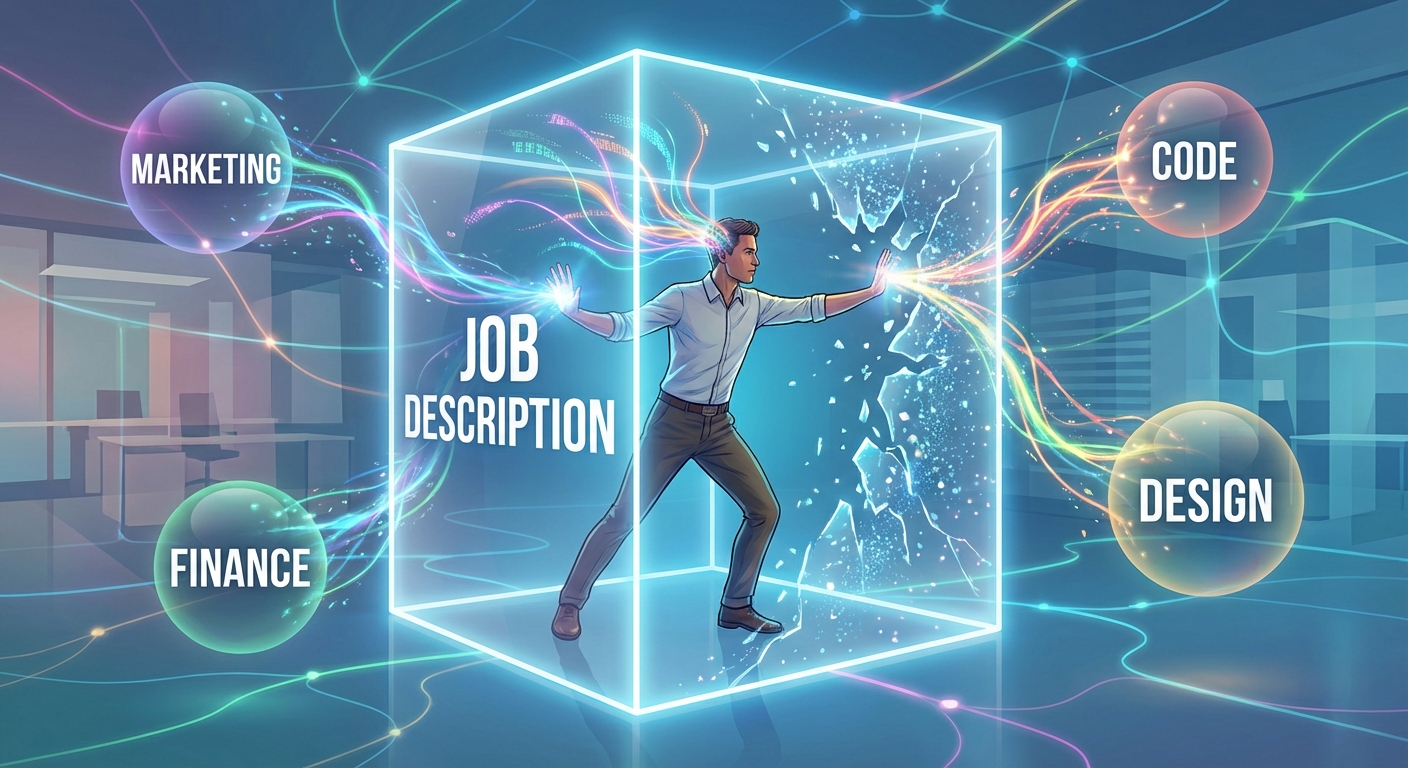
Your role is no longer the boundary
AI allows you to contribute outside your formal job description. That’s the shift.
You don’t need a promotion. You don’t need approval. You don’t need to become an expert.
In practice, this already looks like sales people drafting marketing copy, HR staff sketching simple financial models, designers reasoning about technical constraints, and developers producing rough UX concepts themselves.
None of these people suddenly mastered a new discipline. They just got far enough to be useful.
The people who benefit most are not the most technical. They are the ones who default to a simple question:
“How could AI help me think about this first?”
Thinking AI-first by default, not as an afterthought, is what creates a 10× employee.
If you want to outperform others, you don’t start by working harder. You start by assuming that for most problems, AI can help you explore options, draft a first pass, or challenge your thinking before you do anything else. Ten-times performance now comes from leverage, not effort.
10× is about range, not speed
Most AI discussions focus on speed: faster emails, quicker reports, shorter cycles. That misses the bigger change.
The real gain is range.
AI collapses the cost of trying things outside your lane. You can explore sales, marketing, product, operations, and engineering at a basic level. When you do that, you start to see connections that siloed roles often miss.
That’s where disproportionate value comes from.
The mess is expected
AI-driven work often looks messy. Half-finished scripts. Rough prototypes. Tools that work just well enough. Experiments that never ship.
This is not inefficiency. It’s learning.
The cost of experimentation has dropped. The cost of waiting has increased. Even technical debt means less than it used to, because tools improve fast and cleanup is cheaper than it once was.
Not experimenting is now the riskier choice.
This isn’t about replacing you, it’s about expanding you
AI is not here to replace you. It’s here to expand the space you can operate in.
It fills in gaps just enough for you to step into adjacent problems. You don’t need to be a marketer to add marketing value. You don’t need to be an accountant to notice financial patterns.
Humans are still doing the important part: connecting ideas, applying judgement, and deciding what matters.
What to do next, if you want to be a 10× employee
You don’t need a strategy document or permission from leadership.
You can start now:
Default to AI-first thinking for most problems.
Use AI to explore adjacent areas, not just your core role.
Bring half-formed but thoughtful ideas, not polished perfection.
Treat experimentation as part of your job, not a distraction from it.
Measure yourself by the value you create, not the box you sit in.
The people who will stand out over the next few years will not be the ones who stayed neatly inside their lane.
They will be the ones who expanded it.
Think AI-first. Act broader than your job description.
Ever find yourself mentally juggling too many tasks? Meetings, deadlines, follow-ups – the list seems endless. Cognitive overload happens when you push your brain to handle more information than it comfortably can, leading to reduced effectiveness and unnecessary stress. Fortunately, there’s an elegant solution: Cognitive offloading with AI.
What is Cognitive Offloading?
Cognitive offloading is simply delegating mental tasks to external tools to free your mind from excessive cognitive load. Traditionally, we’ve done this with simple tools – calendars, to-do lists, and reminder apps. Now, powerful AI tools offer next-level cognitive offloading, managing complex mental tasks far beyond basic scheduling.
Why Cognitive Offloading Matters
Improved Focus By handing off mundane or repetitive tasks to AI, your mind can zero in on higher-value work – like strategy or creative problem-solving.
Reduced Mental Fatigue Decision fatigue accumulates throughout your day. Delegating small decisions (“What’s the best phrasing for this email?”) conserves mental energy for big-picture thinking.
Better Quality Outputs AI handles routine work reliably. An AI assistant won’t overlook small but critical details, making sure your outputs are consistently high-quality.
How to Use AI for Cognitive Offloading
Emails and Communication
Drafting Emails: Tools like ChatGPT can rapidly produce clear, effective drafts. Adjust the AI-generated content as needed, but you’ll start from a strong baseline.
Summarising Conversations: AI meeting assistants summarise lengthy conversations, capturing essential action items without taxing your memory.
Task Management
Prioritisation: AI-powered task managers automatically highlight what’s urgent and what’s important, freeing your mind from constantly reassessing priorities.
Reminder Automation: AI reminders prompt you proactively, reducing anxiety about forgetting tasks.
Decision Support
Information Synthesis: AI quickly analyses large data sets, delivering insights you can use to make informed decisions without drowning in details.
Creative Idea Generation: AI tools like Claude or ChatGPT can suggest multiple options quickly, kickstarting your creative thinking without heavy initial cognitive effort.
Practical Steps to Start Cognitive Offloading
Identify Repetitive Tasks: Audit your weekly activities—flag tasks that don’t require your unique perspective or creativity.
Choose AI Tools Wisely: Not every AI tool fits every situation. Select tools that integrate smoothly into your workflow.
Test and Refine: Experiment with AI assistance in small tasks initially. Gradually increase reliance as trust grows.
The Bottom Line
Embracing cognitive offloading with AI doesn’t mean relinquishing control. Instead, it’s about intelligently leveraging technology to clear your cognitive runway. With AI taking care of routine tasks, your mind is free for strategic thinking and innovation.
Clear your mind, boost your productivity, and let AI handle the cognitive clutter.
As someone deeply entrenched in the world of technology and software development, I’ve witnessed firsthand the remarkable evolution of this industry. It’s been a journey from the early days of bulky mainframes and cryptic command lines to the sleek, intelligent systems of today – and there’s no sign of slowing down. This post delves into the rich history of software development, tracing the pivotal moments and groundbreaking innovations that have brought us to the current state of digital sophistication. We’ll explore the past, assess the present, and take a speculative glance into the future, where AI, AR and quantum computing are poised to redefine what’s possible.
Timeline of Industry Trends in Custom Software Development
1950s-1960s: Mainframe Era
Figure: mainframes took up whole floors of buildings
Introduction of mainframe computers.
Command-line interface and batch processing.
Dominance of languages like COBOL and FORTRAN.
1960s-1970s: Rise of Minicomputers
Figure: Early Minicomputers were still the size of filing cabinets
Minicomputers offer a smaller, more affordable option.
Continued use of command-line interfaces.
Expansion into businesses and academic institutions.
1980s: Birth of Personal Computersand Windows Development
Figure: Early Windows applications
Personal computers bring computing to a wider audience.
Introduction of Graphical User Interfaces (GUIs): GUIs revolutionize user interaction with computers, making them more user-friendly and accessible to non-technical users.
Launch of Microsoft Windows: Windows becomes a significant player in the software development world, popularizing the use of GUIs in personal computing.
Development of software applications for Windows accelerates, marking a significant shift in how software is designed and interacted with.
1990s: Internet and Web Development
Figure: Dell’s original website
The rise of the internet and web browsers.
Shift towards web development: from static to dynamic web applications.
Emergence of web-based languages and technologies (HTML, JavaScript, PHP).
2000s: Business Intelligence (BI)
As businesses started to generate and collect more data, there was a growing need for tools and methodologies to analyze this data for strategic decision-making.
BI tools began to evolve from basic data reporting functions to more sophisticated analytics, including data mining, online analytical processing (OLAP), and later, predictive analytics.
The focus shifted towards providing business users with insights for performance measurement, identifying trends, and making informed decisions based on data.
This era also saw the integration of BI solutions with other business systems, improving accessibility and usability for non-technical users.
2010s: SaaS, Cloud Computing and Big Data
Figure: SaaS offerings like SalesForce
Cloud computing (Azure, AWS, Google Cloud) becomes mainstream.
SaaS (Software as a Service) models gain popularity.
Focus on big data analytics and processing.
BI tools further evolved. They began to handle larger data sets, offering more advanced analytics capabilities, and providing cloud-based, scalable solutions.
Late 2010s: AI and Machine Learning
Figure: Google’s Tensor Flow showing a machine learning model being trained
Integration of AI and machine learning into applications.
Rise of data-driven decision-making and predictive analytics.
Advancements in natural language processing and automation.
2020s: DevOps, IoT, and Cybersecurity
Widespread adoption of Agile and DevOps methodologies.
Growth of the Internet of Things (IoT) and connected devices.
Increased focus on cybersecurity in software development.
2020s: Remote Work and Distributed Teams
The COVID-19 pandemic accelerates remote work trends.
Emphasis on tools and practices for remote software development.
Ok. That brings us to now. We’re building web and mobile applications with good DevOps, while prioritising remote access, and starting to incorporate more and more AI features… so let’s look at what’s coming next:
Future Trends (2020s and Beyond)
Continued advancement in AI and machine learning.
The realm of AI and machine learning isn’t just advancing; it’s evolving at a breakneck pace. What was once the domain of theoretical research is now driving the core of many modern applications. From predictive analytics that power business decisions to AI-driven personal assistants in our smartphones, the practical applications of these technologies are becoming increasingly sophisticated. In the coming years, we’re likely to see even more personalized and intelligent AI solutions, pushing the boundaries of automation, decision-making, and user experience. The integration of AI in various industries isn’t just an add-on anymore; it’s becoming a fundamental aspect of digital innovation.
Emergence of quantum computing and its potential impact.
Quantum computing, often regarded as the next frontier in computational power, is poised to redefine the limits of data processing. Unlike traditional computing, which relies on bits to process information, quantum computing uses quantum bits or qubits. This allows it to process complex datasets much more efficiently. The potential impact of quantum computing is enormous, particularly in fields requiring enormous computational power like cryptography, material science, and complex system modeling. While still in its early stages, the progress in this field could revolutionize how we approach problem-solving in sectors where current computing power hits its limits.
Growth in edge computing and serverless architectures.
Edge computing and serverless architectures are reshaping how we handle data and run applications. Edge computing brings computation and data storage closer to the location where it’s needed, improving response times and saving bandwidth. This is crucial in a world increasingly reliant on IoT devices and mobile computing. Meanwhile, serverless architectures allow developers to build and run applications without managing servers, significantly simplifying operations and reducing costs. This paradigm shift in computing not only enhances efficiency but also allows organizations to focus more on development and innovation rather than infrastructure management.
Projection: 2030s and Beyond
Anticipated integration of virtual reality (VR) and augmented reality (AR) in applications.
The integration of Virtual Reality (VR) and Augmented Reality (AR) into various applications is anticipated to transform our interaction with the digital world. VR, with its immersive environments, is poised to revolutionize industries like gaming, training, and virtual tours, offering experiences that are as close to reality as possible. AR, on the other hand, overlays digital information onto the real world, enhancing everyday activities with interactive and context-rich information. From AR-assisted surgeries to interactive educational experiences and improved retail shopping, these technologies are bridging the gap between the physical and digital realms, creating opportunities for innovation that were once the stuff of science fiction.
Possible advancements in brain-computer interfaces.
Brain-computer interfaces (BCIs) represent a frontier in the convergence of neuroscience and technology. The potential advancements in this field are groundbreaking, offering the promise of directly translating brain activity into computer commands. Imagine controlling devices, communicating, or even navigating digital spaces with just your thoughts. BCIs could revolutionize the way individuals with mobility or speech impairments interact with technology, offering newfound independence. Beyond assistive technologies, the implications in gaming, virtual reality, and even medical diagnostics are profound, potentially leading to a future where the line between thought and action, biology and technology, becomes seamlessly integrated.
Evolution of AI towards more autonomous and intelligent systems.
The evolution of AI is trending towards the creation of more autonomous and intelligent systems, capable of complex decision-making with minimal human intervention. This future wave of AI will likely see systems that not only learn and adapt but also understand context and exhibit a form of ‘intuitive reasoning.’ The goal is to develop AI that can tackle nuanced and sophisticated tasks, from advanced medical diagnostics to real-time, complex problem-solving in unpredictable environments. As these systems become more capable, the emphasis will also shift towards ensuring they operate within ethical and responsible frameworks, balancing autonomy with accountability. This evolution represents not just a technological leap, but a paradigm shift in how we conceive of and interact with intelligent systems.
In a world where technology changes at the speed of light, some principles for selling custom software development remain timeless. Discover the enduring sales strategies that have stood the test of time and will set you up for success, no matter what comes next.
As the General Manager and an Account Manager at SSW, I’ve had my fair share of challenges in selling custom software development. It’s a field filled with complexities, risks, and uncertainties. But over the years, I’ve discovered that certain sales principles, when applied with care and understanding, can turn these challenges into opportunities. Let’s explore these principles in detail.
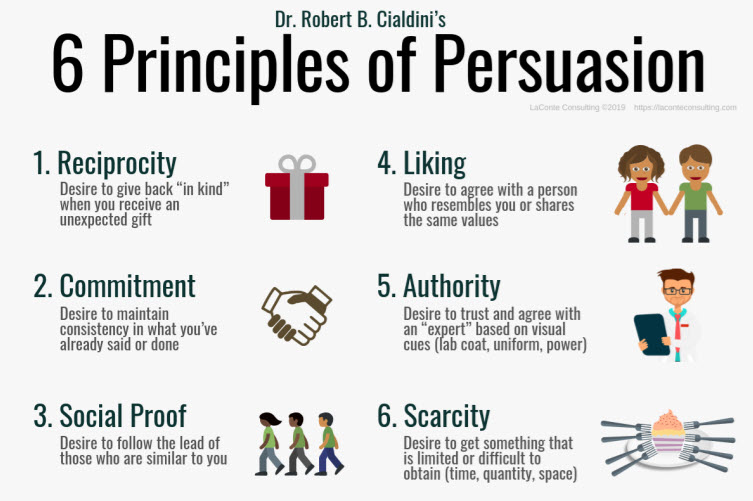
Figure: Cialdini formalised these in his famous book, Pre-suasion, but I’ve put the below in my own order of importance
1. Authority: It’s About Proof, Not Promises
The Importance of Authority: In the competitive field of custom software development, establishing authority is paramount. It’s not about claiming expertise; it’s about demonstrating it through tangible evidence and a consistent track record.
Example from SSW: Over the past 30 years, SSW has been actively creating and curating industry-leading practices on software development and project management. This collection, available at ssw.com.au/rules, serves as a resource for both our team and the broader community. Mentioning this in meetings isn’t merely a talking point; it’s a concrete demonstration of SSW’s authority on the subject.
Further Insights: Authority is also built through case studies that showcase problem-solving capabilities, certifications that align with industry standards, and hands-on expertise in Scrum and software development. It’s about transparency and a willingness to share the process, making clients feel at ease.
2. Reciprocity: More Than Just Freebies
The Power of Giving: Reciprocation is about offering something of value to create a sense of obligation, fostering a more engaging relationship with potential clients.
Example from SSW: At SSW, we’ve taken the concept of reciprocation to heart. Whether it’s through free initial meetings, giveaways like USBs and Notebooks, or providing valuable insights into the latest industry trends, we strive to give before we ask.
Further Insights: Reciprocation goes beyond tangible gifts; it’s about sharing expertise and knowledge, demonstrating commitment to the client’s success, and building a relationship founded on trust and mutual respect. It’s a subtle yet effective way to show potential clients that we understand their needs.
3. Building Trust: Honesty is Our Best Policy
Why Trust Matters: Trust is the cornerstone of any successful business relationship, especially in a field as complex as custom software development. Clients often come with their own set of fears, uncertainties, and doubts (FUD), and addressing these feelings head on is essential.
Example from SSW: In a recent meeting with a potential client, I openly discussed the risks involved in custom software development and how SSW has successfully navigated similar challenges in the past. This candid approach not only built trust but also helped alleviate the client’s FUD by demonstrating our expertise and commitment to transparency.
Further Insights: Building trust is about being open and honest about the challenges and how to overcome them. It’s about showing empathy, understanding the client’s concerns, and providing reassurance through proven strategies and examples. By acknowledging and addressing FUD directly, we can turn potential obstacles into opportunities for connection and collaboration.
4. Solution Selling: Tailoring to Needs
Understanding the Client: Every client has unique needs and pain points. Understanding these and tailoring the pitch accordingly leads to more meaningful connections.
Example from SSW: By focusing on solutions rather than generic services, we’ve been able to resonate with clients on a deeper level. We listen, understand, and create a customized approach that speaks directly to their specific needs.
Further Insights: Solution selling is about empathy and customization. It’s about moving away from a one-size-fits-all approach and crafting a proposal that aligns with the client’s unique requirements and goals.
5. Scarcity & Urgency: Limited Availability and Time-Sensitive Offers
Principle:
Scarcity and urgency are key sales drivers. Scarcity highlights limited availability, while urgency speeds up decision-making. In custom software development, these can be combined for a strong sales pitch.
SSW Example:
Our developers are in high demand for their expertise and quality work. We emphasize:
Limited Availability: Our top developers are often fully booked.
Time-Sensitivity: Deadlines and project timelines add urgency.
Limited-Time Offers: Special pricing or features are occasionally available for quick commitments.
Further Insights:
This isn’t artificial demand; it’s our business reality. Limited availability and time-sensitive offers create urgency, encouraging clients to act quickly for the chance to work with our top-notch team.
Other Sales Principles:
6. Commitment and Consistency: Encouraging clients to make small commitments can lead to larger commitments later on. It’s about building momentum and consistency in the relationship.
7. Social Proof: Sharing testimonials, case studies, or endorsements from satisfied clients adds credibility and demonstrates value.
8. Likability: Building rapport and finding common ground fosters a positive relationship. It’s about connecting on a personal level.
9. Storytelling: Using stories to convey information makes it more engaging and relatable. Sharing success stories or client experiences adds a human touch.
Conclusion
Selling custom software development is a complex and nuanced task. But by applying universal sales principles such as building trust, showing authority, practicing reciprocation, and being candid about the challenges, we can turn potential risks into opportunities. These principles, while illustrated through my experiences at SSW, are applicable across various fields and can be a valuable guide for anyone looking to enhance their sales approach. Whether you’re a seasoned professional or just starting in sales, these insights offer a roadmap to success in the ever-changing landscape of custom software development.
So, at the moment, I’m thinking a lot about how to take advantage of ChatGPT, so I thought I’d map it all out into a blog post to help me crystalise my thoughts. I’m also, of course, using it to help me write this… here goes 🙂
What is GPT-4?
GPT-4 is an artificial intelligence language model developed by OpenAI that has the ability to generate human-like text, translate languages, summarize documents, and perform a wide range of natural language processing tasks. In this blog post, we will explore how you can use GPT-4 to improve your productivity at work and ensure that your employees start using it too.
Writing Assistance 📝
One of the most useful applications of GPT-4 is writing assistance. Writing is a critical aspect of many jobs, and it can be time-consuming and mentally taxing to produce high-quality written content. GPT-4 can help you overcome these challenges by providing suggestions for improving the clarity and tone of your writing. Here are some examples of how GPT-4 can help you write more effectively:
Emails: Writing clear and concise emails is essential for effective communication in the workplace. With GPT-4, you can input a few keywords or a rough draft of your message, and it will generate potential sentences or paragraphs that you can use or modify to suit your needs. For example, if you’re struggling to find the right words to express gratitude in an email to a colleague, you can input a few keywords like “thank you” or “appreciate” and let GPT-4 generate potential phrases that you can use in your message.
Reports: Reports are a common type of business document that can be time-consuming and challenging to write. GPT-4 can help you save time and reduce the amount of mental energy required to write reports by generating potential sentences or paragraphs based on your input. For example, if you’re struggling to find the right words to describe the results of a study in a report, you can input the key findings and let GPT-4 generate potential phrases that you can use in your document.
Presentations: Presentations are an essential part of many jobs, and they require effective communication skills. GPT-4 can help you generate compelling and engaging content for your presentations by providing suggestions for improving the clarity and tone of your writing. For example, if you’re struggling to find the right words to describe a product or service in a presentation, you can input some basic information about the product or service and let GPT-4 generate potential sentences or paragraphs that you can use in your presentation.
Web Content: If you need landing pages, or really any content for a web page, GPT-4 can generate great content, tailored for your target audience. Just make sure you include enough parameters into your prompt to make the output generated optimal for your specific case. A generic promp will produce generic content.
Research Assistance 🔍
Research is another critical aspect of many jobs, and it can be time-consuming and challenging to find the information you need to complete your work. GPT-4 can help you overcome these challenges by providing research assistance. Here are some examples of how GPT-4 can help you with research:
Article Summaries: Reading and summarizing articles is a common research task that can be time-consuming and challenging. GPT-4 can help you save time by generating summaries of articles based on your input. For example, if you need to read a lengthy article for work but don’t have time to read the entire thing, you can input the article and let GPT-4 generate a summary that highlights the most important points.
Related Articles: Finding related articles to support your research can be challenging. GPT-4 can help you find related articles by analyzing the content of the articles you’re interested in and suggesting other articles that are related to the same topic.
Keyword Suggestions: Choosing the right keywords for your research can be challenging. GPT-4 can help you by suggesting keywords based on your input. For example, if you’re researching the effects of climate change on agriculture, you can input some basic information about the topic and let GPT-4 suggest keywords that you can use to search for relevant articles.
Customer Service Automation 🤖
Customer service is another area where GPT-4 can help improve your productivity. Automating simple customer service tasks can save your employees time and allow them to focus on more complex issues. Here are some examples of how GPT-4 can help automate customer service:
Frequently Asked Questions: Many companies have a set of frequently asked questions (FAQs) that customers ask repeatedly. GPT-4 can help you automate the process of answering these questions by generating responses based on the question. For example, if a customer asks “What is your return policy?”, GPT-4 can generate a response that explains the return policy.
Simple Inquiries: In addition to FAQs, many customers have simple inquiries that can be handled quickly and easily. GPT-4 can help automate the process of answering these inquiries by generating responses based on the inquiry. For example, if a customer asks “What are your store hours?”, GPT-4 can generate a response that provides the store hours.
Translation 🌐
Translation is another area where GPT-4 can help improve your productivity. Communicating effectively with people who speak different languages is essential in today’s global economy. GPT-4 can help you overcome language barriers by translating text between languages. Here are some examples of how GPT-4 can help with translation:
Business Documents: Many businesses have documents that need to be translated into multiple languages. GPT-4 can help you save time and reduce the cost of translation by automatically translating these documents. For example, if you have a product manual that needs to be translated into multiple languages, you can input the manual and let GPT-4 generate translations in the desired languages.
Customer Communications: Communicating effectively with customers who speak different languages is essential for providing excellent customer service. GPT-4 can help you overcome language barriers by translating customer communications. For example, if a customer emails your company in a language you don’t speak, you can input the email and let GPT-4 generate a translation that you can use to respond to the customer.
How to Ensure Your Employees Start Using GPT-4 💡
Introducing new technology to your employees can be challenging. Here are some tips to help ensure that your employees start using GPT-4:
Provide Training: Make sure to provide training on how to use GPT-4 effectively. This will help your employees feel more comfortable using the technology and make them more productive.
Set Expectations: Let your employees know how you expect them to use GPT-4. This will help ensure that they use it in ways that align with your business goals.
Offer Incentives: Consider offering incentives for employees who use GPT-4 effectively. This can help motivate them to learn and use the technology.
Lead by Example: Make sure to use GPT-4 yourself and share your experiences with your employees. This will help demonstrate the value of the technology and encourage your employees to use it too.
Share Wins: When someone has a big win using it, let everyone else know, so that they can emulate the behaviour.
Conclusion
GPT-4 is a powerful technology that can help improve your productivity and save you time. Its writing assistance, research assistance, customer service automation, and translation capabilities can all be invaluable assets for businesses. However, introducing new technology to your employees can be challenging.
By providing training, setting expectations, offering incentives, and leading by example, you can ensure that your employees start using GPT-4 effectively. With the right approach, GPT-4 can become an integral part of your company’s technology stack and help you stay ahead of the competition.
ChatGPT is a language model developed by OpenAI that can generate human-like text based on a given prompt. It is part of the GPT (Generative Pretrained Transformer) family of language models, which are state-of-the-art models in the field of natural language processing (NLP).
The model is trained on a massive dataset of text, which allows it to generate text that is similar to what a human might write or say. The training process involves providing the model with a large number of input sequences and corresponding target sequences, allowing it to learn patterns and relationships in the data. The result is a highly sophisticated language model that can generate a wide range of text, from news articles to poetry and beyond.
One of the key advantages of ChatGPT is its ability to understand and respond to natural language inputs in a conversational manner. This makes it a popular choice for building chatbots, which can engage in human-like dialogue with users and provide information, answer questions, and complete tasks. For example, a chatbot built with ChatGPT can be integrated into a website, messaging platform, or mobile app, allowing users to interact with the chatbot in real-time.
Another advantage of ChatGPT is its scalability. Because the model is trained using deep learning techniques, it can be easily fine-tuned for specific tasks or domains. This means that developers can customize the model to their specific needs, whether it’s for a specific industry or language, by fine-tuning it on a smaller dataset that is relevant to the task at hand. This allows the model to generate more accurate and relevant text, which can improve the user experience and increase the efficiency of the chatbot.
One potential limitation of ChatGPT is its tendency to generate biased text. This can occur if the model is trained on a dataset that contains biases, such as gender, race, or cultural biases. This can result in the chatbot generating text that is offensive or insensitive, which can have negative consequences for the user experience. To mitigate this risk, it is important for developers to carefully curate the training data and be aware of any potential biases in the dataset.
In conclusion, ChatGPT is a highly sophisticated language model that offers a range of benefits for developers building chatbots and other NLP applications. Its ability to understand and respond to natural language inputs in a conversational manner, as well as its scalability and customizability, make it a popular choice for developers. However, it is important to be aware of the potential limitations of the model, such as its tendency to generate biased text, and take steps to mitigate these risks. Overall, ChatGPT is a powerful tool that has the potential to transform the field of NLP and the way we interact with technology.
Why is ChatGPT a big deal for tech companies?
ChatGPT is a big deal for tech companies because it represents a major advancement in the field of natural language processing (NLP) and opens up new possibilities for building intelligent chatbots and other NLP-powered applications.
One of the main reasons why ChatGPT is a big deal is its ability to understand and respond to natural language inputs in a conversational manner. This makes it a powerful tool for building chatbots that can engage in human-like dialogue with users, provide information, answer questions, and complete tasks. For example, a chatbot built with ChatGPT can be integrated into a website, messaging platform, or mobile app, allowing users to interact with the chatbot in real-time. This can greatly improve the user experience and increase the efficiency of the chatbot, making it a valuable asset for tech companies.
Another reason why ChatGPT is a big deal is its scalability and customizability. The model can be easily fine-tuned for specific tasks or domains, allowing developers to customize it to their specific needs, whether it’s for a specific industry or language. This allows the model to generate more accurate and relevant text, which can further improve the user experience and increase the efficiency of the chatbot.
The potential applications of ChatGPT are vast and varied, and it has the potential to transform the way we interact with technology. For example, it can be used to build intelligent virtual assistants that can answer questions, complete tasks, and make recommendations, making our lives easier and more convenient. It can also be used in customer service, where it can be used to automate routine tasks and provide fast, accurate responses to customer inquiries.
In conclusion, ChatGPT is a big deal for tech companies because it represents a major advancement in the field of NLP and opens up new possibilities for building intelligent chatbots and other NLP-powered applications. Its ability to understand and respond to natural language inputs in a conversational manner, as well as its scalability and customizability, make it a valuable asset for tech companies, and its potential applications are vast and varied.
Many businesses are dealing with this quandary at the moment, and there a number of factors to keep in mind when deciding how to cater for users on mobile devices. These factors can be broadly broken down into 2 categories: User Experience (UX) and technical considerations.
Firstly, however, lets discuss what these 2 options actually are.
Responsive Web App
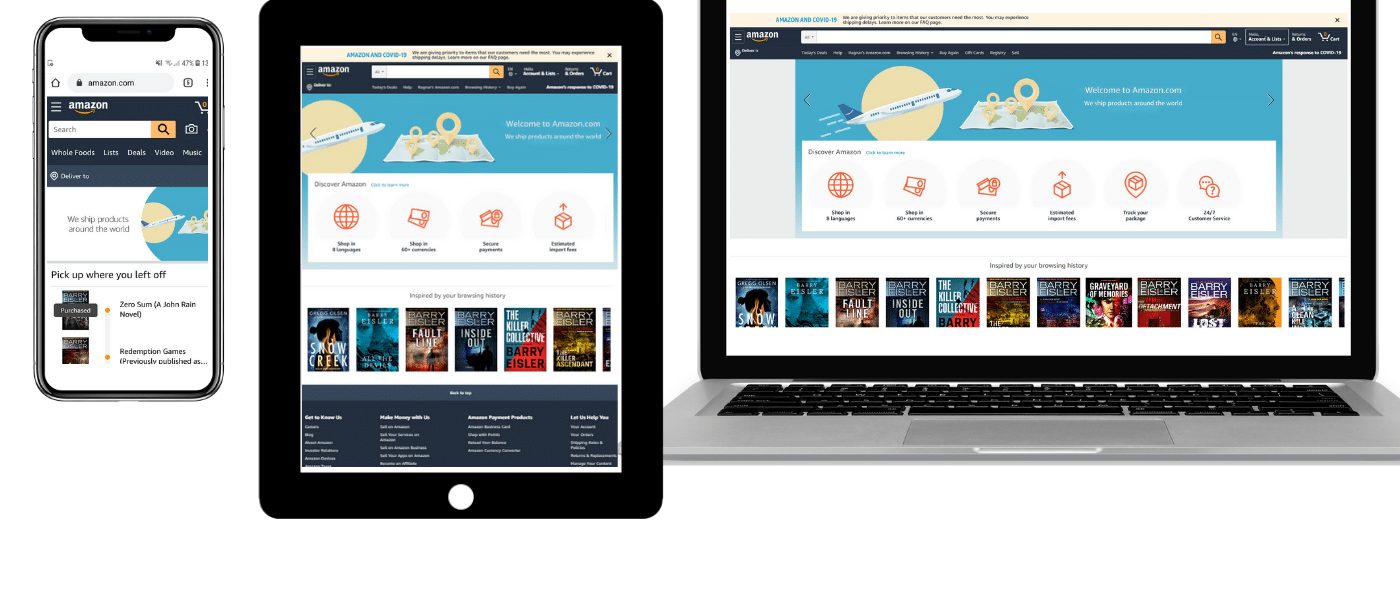
This is a website that shows up differently depending on the screen size you’re viewing it on. For example:
When shown on a PC’s web browser (i.e. a large amount of real estate), it will show everything.
When shown on an iPad’s web browser (i.e. a medium amount of real estate), it repositions some things and potentially removes some parts.
When shown on an mobile phone’s web browser (i.e. a small amount of real estate), it shows a cut down and optimised view, often removing whole sections if necessary.
Figure: This is one responsive web application, that shows different layouts depending on how much real-estate it has access to
Responsive Web App – Decision Factors
The UX benefits of this option include:
Familiar experience – users who use multiple platforms will see a similar experience.
No install – one barrier for use can sometimes be that users may not want to install an app on their mobile from a company that they don’t trust yet.
Some access to phone features – Web apps have recently been given access to many device specific features via the API, meaning that you can now use the phone’s GPS, camera, accelerometer, etc from the browser.
SEO friendly – customers will be able to Google your web app easily… Native apps are not SEO friendly.
Mobile First – if your users are primarily going to be using your web app via their mobiles, you can build the UI with that in mind, and optimise for their experience. In extreme cases, you may not even worry about desktop users at all.
The Technical benefits of Responsive Web Apps include:
Price – it’s generally cheaper to build and maintain 1 application that can be used on any device that has a web browser (PC, Mac, iOS, Android, etc.).
Web Wrapper – If your web app is a Single Page Application (SPA) then by using technologies such as Cordova or Electron, you can wrap them in a native app “shell” that allows them to be installed directly onto a mobile device, and removing the header of the web browser… giving some of the stickiness of a real native app.
Native Mobile App
This is an application that is installed directly onto your mobile device via the App Store (for iOS) or Google Play (for Android).
Figure: Usually, apps that can be opened from your home screen are Native Mobile Apps
Native Mobile App – Decision Factors
The UX benefits of this option include:
Stickiness – You have a button on your phone to open it directly. You don’t need to open the web browser and navigate to the URL.
Full access to phone features – almost anything the phone can do, you now have access to, including multi threading, Augmented Reality libraries, etc.
Offline access – although technically possible to some extent with some web apps, this is much easier for native apps.
The Technical factors of Native Mobile Apps include:
Hybrid – you used to have to build 1 app for iOS, and another completely separate app for Android, but now with technologies such as .NET MAUI, Flutter, Electron, etc, you can build 1 app that will work on both.
Expensive price – if you need a web app anyway, then you’re still doubling up as you’ll need to build and maintain a web app and a mobile app separately.
Code reuse – if you choose your stack carefully, you can get a lot of code reuse across mobile and web platforms. For example, you could have a .NET API, Blazor web UI, and .NET MAUI mobile app, (which can reuse a lot of the Blazor components).
Conclusion
This question can really only be answered by each organisation specifically, but at the risk of oversimplifying:
If you need to keep your costs down, most of your users are on the web app on their desktops anyway, and you don’t need heavy offline access or other phone features, go with a Responsive Web App
If you need to be accessible via the App Store or Google Play, need the experience optimised for mobile users, need phone specific features like offline access, and don’t care about desktop users, go with a Native Mobile App, preferably Hybrid so you only have to build and maintain 1 mobile app
Some people are really good at using Outlook search to find the emails they need, while others have a hard time. Searching for emails can be a real struggle, sometimes you want to find emails from months ago but you aren’t sure exactly what to search for.
Being able to find an email quickly in Outlook is an important skill. Here are some tips and tricks about how to find that email buried in your inbox…
Note: These tips will also help you in your Google/Bing searches too.
Scenario
Let’s take an example scenario and see what tips we can use to search. Last month, you got an email in your inbox from your manager Bob about making changes to how you see data in his Northwind website.
Tip 1: Give the person you are talking to the focus
If you get 10 calls a day, you should be using this tip 10 times a day. When you get a call from Bob, before he has finished saying “how are you” you should have already typed in the search box and be looking at his most recent emails.
To get Bob’s most recent emails the best thing to do, is to limit Outlook to only your inbox folder and only emails from Bob by:
Change the folder to “Current Folder”
Search for: from:Bob
Note #1: You can change the folder scoping to fit your specific needs
Figure: There are several scoping options available
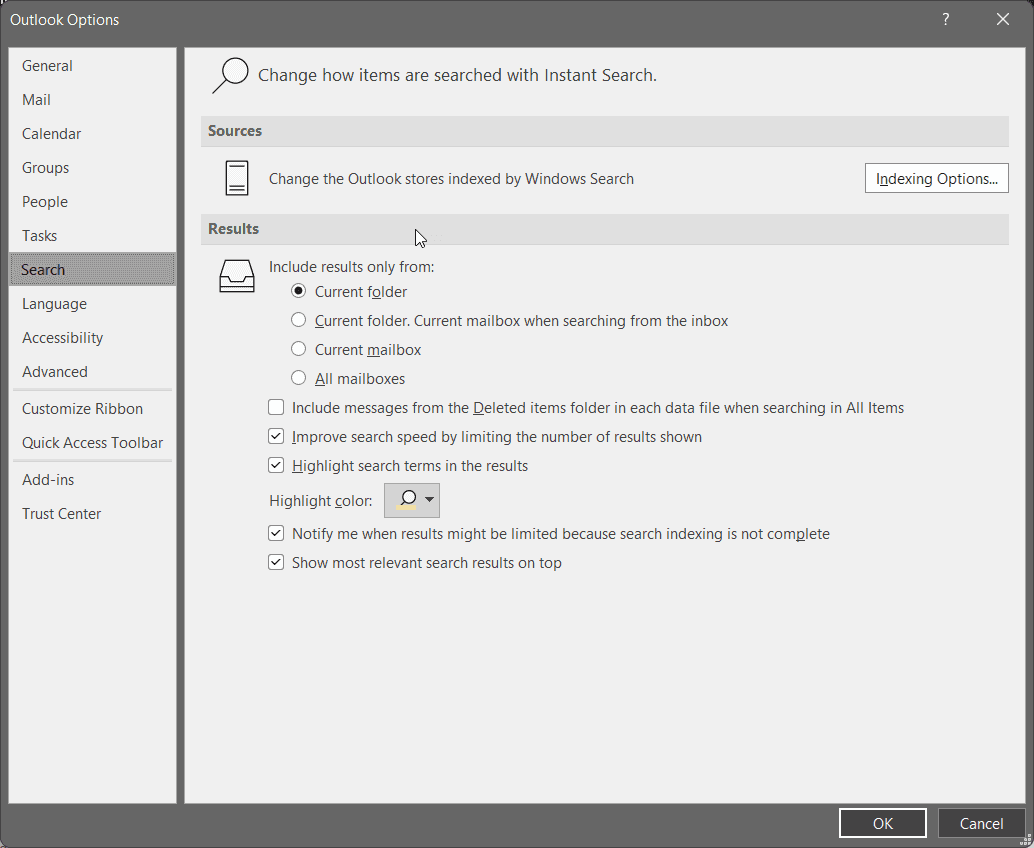
Note #2: You can change the default to always be “Current Folder”
Figure: Outlook Options for Search
Tip 2: Focus on the person (i.e. to: from: cc: bcc:)
There are many different ways to focus on people. If know that the email was sent to Adam, from Bob, Luke was CCed and Chris was BCCed then:
Search for: to:Adam from:Bob cc:Luke bcc:Chris
Tip 3: Focus on the subject (i.e. subject:)
If you have a good idea of what the email subject contains, then the “subject:” scope can help a lot. For example, if you know that the email had Northwind and Bob in the subject then:
Search for: “Subject: Northwind Bob”
Tip 4: Use negatives (i.e. –)
Negatives are a great way to remove results you know definitely won’t be relevant. For example, if you know Luke and Adam frequently work with Bob but weren’t involved in that email then:
Search for: -Luke -Adam
Note: Start with a broad search, and then, when you start seeing irrelevant results about invoicing, add -invoice to your search
Tip 5: Use quotation marks (i.e. “”)
You can search for a direct match in an email using quotation marks. For example, if you know that “days outstanding” was written in the email then:
Search for: “days outstanding”
Note: Particularly useful when using common words but you know they were written in an exact phrase. E.g. “on top of this”
Tip 6: Combine 2 searches into 1 (i.e. OR)
Sometimes you might know a specific thing was referred to, but aren’t sure what terminology was used. For example, let’s say you know the email mentioned either “web app” or “website”. In that case:
Search for: “web app” OR website
Note: Must be upper case… lowercase “or” won’t work
Tip 7: Find a file (i.e. hasattachments:yes)
Emails can be filtered to only include ones with attachments. If you know the email has an attachment then:
Search for: hasattachments:yes
Tip 8: Find a file’s content (i.e. attachment:)
File contents can also be searched. If you know that there was an attachment that contained the text “20/07/2021” then:
Search for: attachment:”20/07/2021″
Note: You must enter dates in USA format #ouch
Tip 9: Focus on the date received (i.e. received=<>)
You can filter on a specific time period or date. For example, If you know that the email was received after 07/20/2019 then:
Search for: received>”07/20/2019″
Note #1: You must enter dates in USA format #ouch
More Info: Outlook has a heap of other properties that you can filter on.
Figure: Outlook has a lot of meta data filtering options
Chris Voss is the expert on this topic, and I highly recommend his book “Never split the difference: Negotiate as if your life depends on it”.
Most people go into a negotiation assuming that it is a zero sum game, and that their opponent in this win-lose encounter is the adversary. The best negotiators, on the other hand aim for a win-win solution, and enlist the help of their negotiating opponent in battling the situation instead.
Your main goals should include:
Doing all you can to show the other side that you are negotiating in good faiths
Becoming genuinely interested in what drives the other side
Building trust-based influence through the use of tactical empathy, or deliberately influencing the other side’s feelings
Aim to deactivate negative feelings and magnify positive feelings
Tone of Voice
Combative negotiators will often use an assertive tone of voice, and this often just gets your opponent off side. Instead, use a mix of these 2:
Playful/accommodating
This is the voice of a bear of truths delivered gently
It promotes collaboration
Use it approximately 80% of the time
Late night FM DJ
Use when they’re upset or agitated
Soothing, downward inflection
Use to highlight an unalterable fact
If you can nail the right tone, you’re that much closer to building trust-based influence and moving together toward a great deal.
Mirroring
This is the conscious repetition of your counterpart’s words. Mirrors are designed to show the other side that you’re listening to them and understanding them.
Example:
Your negotiating partner: “I’ve had a really difficult year, and it seems like you’re discounting all of the financial and personal stress I’ve been under.”
You: “Financial and personal stress?”
Mirroring is a rapport-building technique with wide applicability. It works as well at cocktail parties as it does during hostage negotiations. Mirroring can be an effective means of quelling the often reflexive hostility of confrontational people.
Mirroring can also be used to gather intel. Using it will lead your counterpart to not only repeat themselves but to elaborate and offer additional details. This expands what you know about them and their position.
Labelling
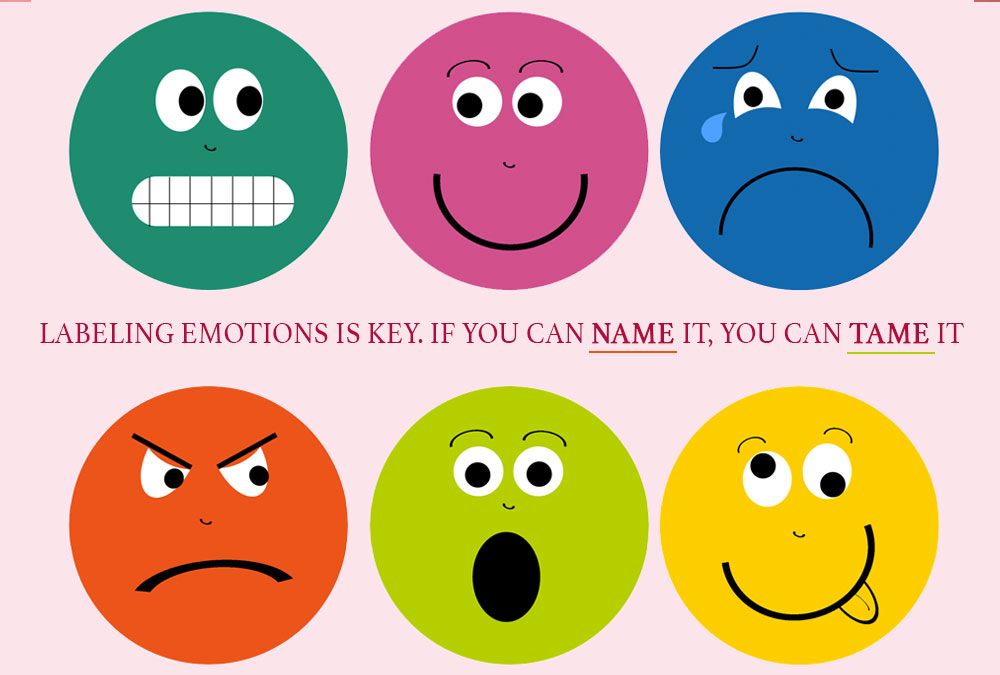
Labelling is used to give voice to the other side’s feelings.
It looks like…
It seems like…
You look like…
Note that you should avoid the 1st person here… don’t say “I’m hearing…” or “I think…”. That would only signal that you are number 1 and everyone else is an afterthought. Keep it about them.
Labelling is designed to let the other side know that you understand their feelings, to help build relationships, and to gather information. It can be used both to reinforce positive emotions and to counteract negative emotions.
Example for a negative:
You: “It seems like you’re finding this project frustrating”
Example for a positive:
You: “It seems like you’ve been working really hard to make sure this project succeeds”
Dynamic Silence
30643845 – coffee break
Leaving a pause for a little longer than feels natural can in some cases help a lot to bring out more information.
Calibrated Questions
Calibrated questions are how and what questions structured for maximum effect. They are designed to change the power dynamic of the negotiation and force consideration of your position into the equation. In other words, they allow the other side to see things from your side of the table and allow everyone to keep their sense of autonomy intact.
Example:
You: “How am I supposed to do that?”
You: “What are you trying to accomplish by doing that?”
These questions also help cultivate the illusion of control in your counterpart. They can serve the same purpose as why questions while sounding less accusatory. Why questions tend to trigger a defensive posture.
Accusations Audit
Unexpressed negative emotions never die. They fester like an infection.
In preparing for a negotiation, you’d be well served to perform an accusations audit, during which you’ll create a comprehensive list of all the negative assumptions, thoughts, and feelings you think the other side may be harbouring against you.
Be exhaustive. Your goal is to list all the possible negative emotions and get out ahead of them. You want the other side to come back and say, “Hold on, you’re being too hard on yourself.” This would be an ideal response, as now your opponent is showing empathy for you.
Yes and No Questions
When it comes to a line of questioning, there are three types of yes answers :
Yes as a commitment (used to agree)
Yes as a confirmation (used to affirm commitment)
Yes as counterfeit (used tactically by someone who doesn’t trust you, feels trapped, or wants you to go away)
Often, a no can be much more valuable than a yes. In certain circumstances, people feel safe and protected by a no.
So, a question like:
“Is this a good idea?” may be better phrased as “Is this a ridiculous idea?”
“Can you agree to do it this way?” could be better presented as “Do you think it’s unreasonable if we can both agree to take things in this direction?”
When answering a yes question, people are going to feel that every piece of information they provide is another commitment to be made. By contrast, a no relieves them of the sense that they may have just surrendered their entire negotiating position.
And don’t forget that no is equally valuable to your own cause. After saying no, use dynamic silence to let it sink in, demonstrating to your partner that you stand by your word.
Defeating Fear of Loss
Young man frightened on white background.
One of the primary negative emotions that can derail a negotiation is the fear of loss. Neuroscience teaches us that fear is a dominant factor in human decision-making. Use your skills to try and figure out what the other side is scared of losing.
Know that people will begin to talk about a deal being “fair” once they feel backed into a corner. Fairness, in this moment, becomes the end all/be all of the negotiation. People will even walk away from a good deal if they feel like they’ve been treated unfairly.
If you get the sense that the people across the table think you’re being unfair, encourage them to speak their minds about it. Then ask for a few examples of how you’ve allegedly been mistreating them. You may find that the other side’s idea of fairness will result in something that’s totally unfair for you. The key to negotiation may be deference, but that doesn’t equate to subservience.
Do whatever you can to deactivate this fear of loss—remember your mirrors and labels—and keep your negotiation grounded, collaborative, and positive.
Bargaining Strategies
When negotiating, it’s always best to steer clear of a bargaining situation. But sometimes it’s unavoidable. Below are the stages of the Ackerman system. It’s paramount to employ tactical empathy between each round:
Establish a target price for the goods you want to buy.
Make an initial offer at 65 percent of your target price.
Assuming no deal, raise your price by 20 percent.
Assuming no deal, raise your price by 10 percent.
If still no deal, raise by another 5 percent.
Your final offer should be an odd number, and you should be prepared to include some non-monetary compensation to show them you’re committing all of your available resources.
Body Language and Speech Patterns
We all have one way of telling the truth. If you can identify how your counterpart looks and sounds when he or she is being honest with you, then you’ll be able to detect any deviations from that pattern that may signal a lie. Keep the following in mind:
The Pinocchio Effect People who are being dishonest tend to use more words and effort than necessary to communicate their point.
The 7-38-55 Rule In interpersonal communications, 7 percent of a person’s effort is conveyed via spoken words, 38 percent by tone of voice, and 55 percent through body language.
When you’re at the negotiating table, pay attention to how people speak and act. Do the words they’re saying match up with the way they’re carrying themselves? Look at the people who are not talking—what does their body language signal to you? People who are being sincere don’t typically calculate their body language. The opposite is true of people who are being dishonest.
If you sense people are being deceitful, deploy a label using your inquisitive inflection: “It seems like I’ve missed something here?” A lie indicates that the other side is afraid to tell you the truth—they perceive you as a threat. In short, you’ve just encountered more negative emotions to be deactivated. To help defuse them, revert again to the late-night FM DJ voice, avoid all traces of accusation, and get your counterparts to drop their guard.
There’s a filter I try to use every day to make sure I’m maximizing the effect my work is having on the business. It’s called the 80-20 rule, or the Pareto Principle.
The theory states that
20% of your customers will give you 80% of your revenue
You wear 20% of your clothes 80% of the time
You use 20% of software features to get 80% of the value of that software
20% of the population control 80% of the wealth
20% of the players in a sports team create 80% of the wins
You spend 20% of your time to produce 80% of your day’s output
And the one we really care about today: 20% of the effort you make produces 80% of the results
It comes down to whether you use your time efficiently or effectively. AKA working smarter, not harder.
Efficiency
You may spend a busy day getting a lot done, ticking off a lot of tasks, having a lot of meetings, and finishing the day thinking, “I used my time efficiently today and got a lot done”. You give yourself a pat on the back and think you did well, but did you actually do anything useful today? Or did you just complete a bunch of stuff that didn’t really matter.
Effectiveness
Instead, take some time at the beginning of the day to work out which of the tasks on your plate really matter. Which ones will unblock others and allow them to get more done. Which will have a disproportionate result on the business. Over time you’ll be able to work out a hierarchy of work, allowing you to do it in the right order every time without having to think too hard about it. You may find that you end up getting fewer tasks done in a day, but the ones you did were important, and really made a difference.






















 The Chief Operating Officer